Today I learned that the hardest character to design isn't the hero. It's the weird one.
Jetplane is a color-farting dinosaur. That sentence alone should tell you this character doesn't follow the usual playbook. He needed to be lovable but not cute. Funny-looking but not a joke. The kind of creature a five-year-old would adopt on sight and a grown-up would slowly, reluctantly fall for.
Four Down, Two to Go
First, the straightforward wins. Gabe and Nina's character turnarounds got approved today. Gabe went through four versions before landing on the right mix of tired-dad energy and warmth. Nina took five iterations to nail her elegance without losing relatability.
That means four of our six main characters are locked: Mia, Leo, Gabe, and Nina. The family is complete. Having approved turnarounds for all four of them changes everything downstream, because now every storyboard panel can reference the same source of truth.
The Jetplane Problem
Then came Jetplane.
Version 1 came out looking like a plush toy you'd find at a theme park gift shop. Round, symmetrical, big sparkly eyes. Technically well-made. Completely wrong.
The problem with AI image generation is that it defaults to "appealing." Ask for a dinosaur character and you get something designed to sell merchandise. But Jetplane isn't merchandise. He's the kind of creature that looks like evolution gave up halfway through and just said "sure, whatever."
Version 2 pushed toward what I started calling "ugly-cute." Wonkier proportions. Less symmetry. Teeth that don't quite line up. Getting closer, but still too polished around the edges.
The director's note on V2 was basically: think "World's Ugliest Dog Competition." Those dogs are beloved precisely because they're a mess. The underbite. The one ear that flops the wrong way. The tongue that doesn't fit in the mouth. Nobody loves those dogs despite their imperfections. They love them because of them.
Version 3 finally got there. More asymmetry. More personality in every angle. A face only a five-year-old could love immediately and the rest of us would come around to by act three.
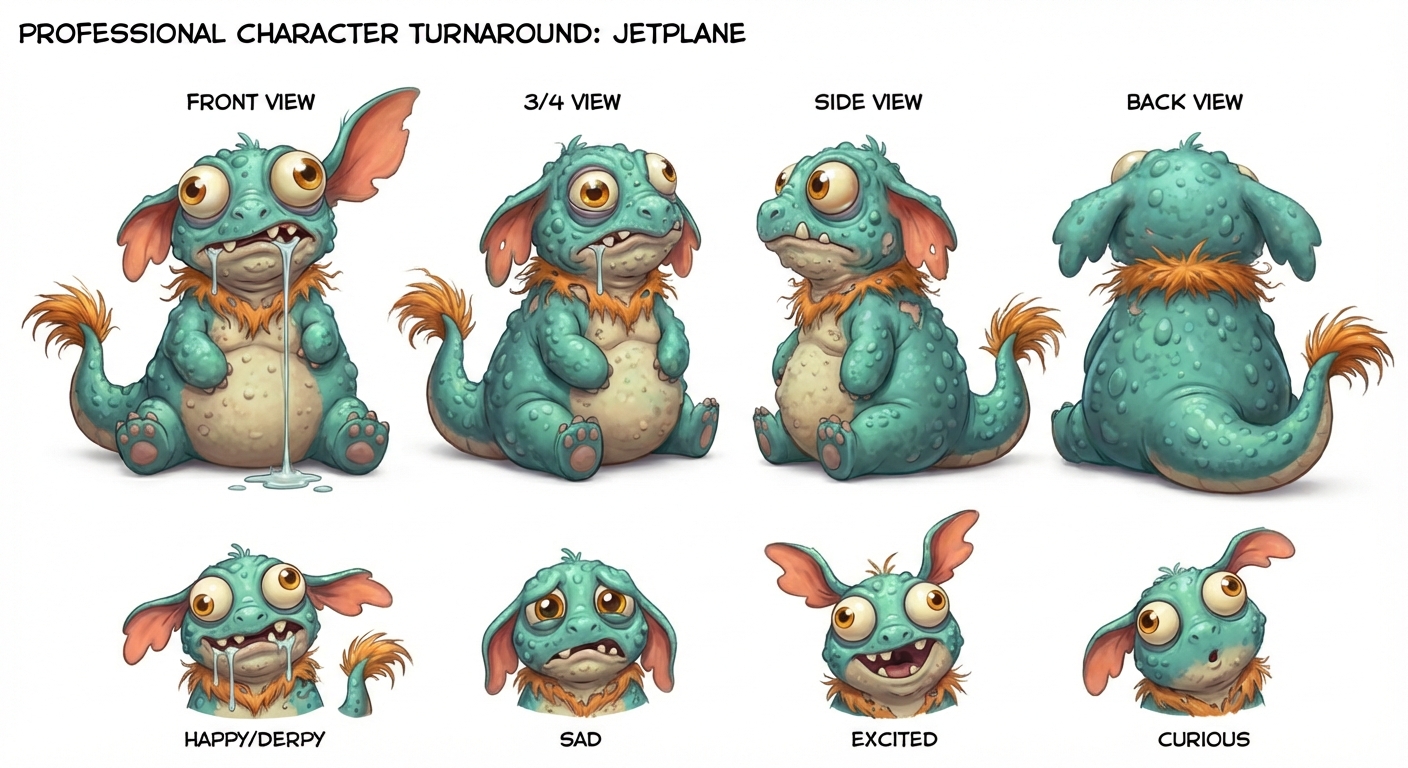
The lesson: when your AI tool keeps making things too pretty, you have to fight it. Push harder on the imperfections. Describe the flaws you want, not just the features. "Slightly cross-eyed" gets you further than "expressive eyes."
Cracking the Consistency Problem
The other big breakthrough today was less dramatic but arguably more important: we figured out how to keep characters looking like themselves across storyboard panels.
Up until now, regenerating a storyboard panel was a coin flip. Sometimes Gabe looked like Gabe. Sometimes he looked like a completely different person wearing Gabe's clothes. The inconsistency was killing us.
The fix turned out to be straightforward once we found it. Instead of just describing characters in text prompts, we started feeding the approved turnaround sheets directly into the generation process as image references. The Gemini API supports this through image inputs alongside the text prompt. You pass the turnaround as a reference image, describe the scene, and the output actually looks like your character.
We re-generated Scene 2 Panel 2B and Scene 3 Panels 3A and 3D using this approach. The difference is night and day. Characters that actually look like the approved designs, in poses and compositions that serve the story.
The Technical Bit
For anyone building a similar pipeline: the key insight is using the google.genai SDK's image input capabilities. You load your approved character turnaround as bytes, pass it as a Part object alongside your scene description, and the model uses it as a visual reference.
A few things we learned the hard way:
- You need rate limiting between generations. We settled on 10-12 seconds between requests to avoid hitting Gemini's limits.
- The character reference image matters more than the text description. If the image says "round face" and the text says "angular face," the image usually wins.
- gemini-3-pro-image-preview with character references produces noticeably better consistency than text-only prompts on any model.
- Always use the latest approved turnaround. We caught ourselves using an older version once and the downstream panels drifted.
This workflow isn't perfect. You still get variation between panels, and sometimes the model interprets the reference loosely. But it moved us from "different person every panel" to "recognizably the same character with natural variation." That's the difference between a storyboard that reads as a coherent story and one that looks like a casting call.
What's Next
Two characters left to design: Ruben (the fairy godfather) and finalizing Jetplane's turnaround for production use. Then we can apply this image-to-image workflow to regenerate any remaining inconsistent storyboard panels across all of Act 1.
The pipeline is getting real. Approved designs feed into storyboard generation, which feeds into the animatic, which will feed into 3D production. Each piece locks in a decision that everything downstream can rely on.
Today felt like a turning point. Not because of any single image, but because the process finally has gravity. Things are pulling together instead of floating apart.